pyku.mask#
Module managing masking
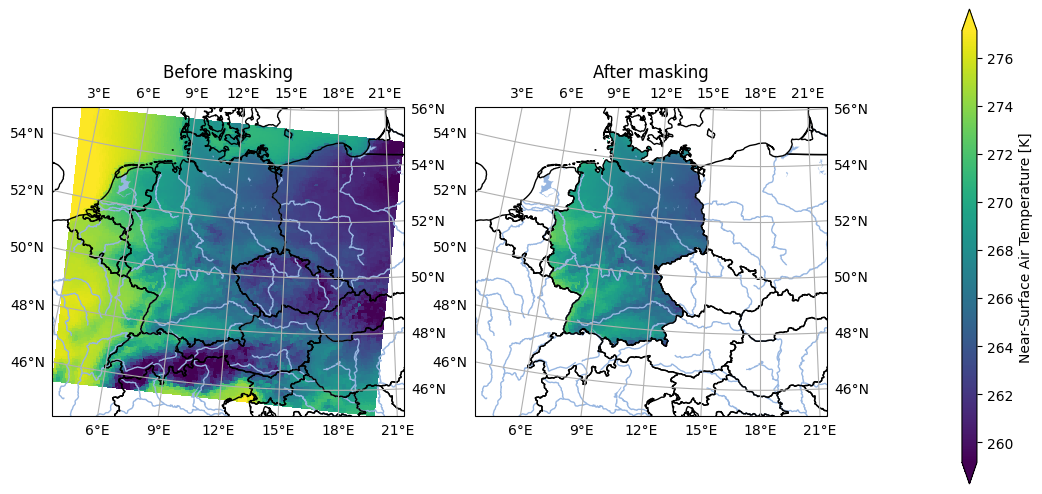
- pyku.mask.apply_mask(dat, mask, from_nans=False, tolerance=0.001)[source]#
Mask data
- Parameters:
dat (
xarray.Dataset) – The input data.mask (
xarray.Dataset,geopandas.GeoDataFrame) – The mask can either be a polygon or a raster dataset with the same projection coordinates as the input data.from_nans (bool) – Optional. Indicates whether the mask is derived from NaN values.
tolerance (float) – Optional. A small value used as the default tolerance for aligning georeferencing. If the projection coordinates between the datasets are not an exact match, alignment occurs if falling within this tolerance.
- Returns:
Data with the applied mask.
- Return type:
Example
In [1]: import pyku, pyku.mask, pyku.analyse
   ...: import pyku.features
   ...:
   ...: # Load example model data in rotated lon lat projection
   ...: # -----------------------------------------------------
   ...:
   ...: ds1 = \
   ...:    pyku.resources.get_test_data('model_data').isel(time=0)
   ...:
   ...: # Load example hostrada data over germany in lcc projection
   ...: # ---------------------------------------------------------
   ...:
   ...: ds2 = pyku.resources.get_test_data('hostrada').isel(time=0)
   ...:
   ...: # Polygonize the mask of hostrada and apply to model data
   ...: # -------------------------------------------------------
   ...:
   ...: ds1_masked = (
   ...:     pyku.resources.get_test_data('model_data')
   ...:     .isel(time=0).pyku.apply_mask(ds2.pyku.polygonize())
   ...: )
   ...:
   ...: # Show mask before and after
   ...: # --------------------------
   ...:
   ...: pyku.analyse.two_maps(
   ...:     ds1.assign_attrs({'label': 'Before masking'}),
   ...:     ds1_masked.assign_attrs({'label': 'After masking'}),
   ...:     var='tas',
   ...:     crs='EUR-44',
   ...:     size_inches=(10,5)
   ...: )
   ...:
- pyku.mask.apply_polygon_mask(dat, mask, from_nans=False, tolerance=0.001)[source]#
Mask data
- Parameters:
dat (
xarray.Dataset) – The input data.mask (
geopandas.GeoDataFrame) – The mask representing either a polygon or a DataArray with the same projection coordinates.from_nans (bool) – Indicates whether the mask is derived from NaN values.
tolerance (float) – A small value used as the default tolerance for aligning georeferencing. If the projection coordinates between the datasets are not an exact match, alignment occurs if falling within this tolerance.
- Returns:
Data with the applied mask.
- Return type:
Example
In [1]: import pyku, pyku.mask, pyku.analyse
   ...: import pyku.features
   ...:
   ...: # Load example model data in rotated lon lat projection
   ...: # -----------------------------------------------------
   ...:
   ...: ds1 = (
   ...:     pyku.resources.get_test_data('model_data')
   ...:     .isel(time=0)
   ...: )
   ...:
   ...: # Load example hostrada data over germany in lcc projection
   ...: # ---------------------------------------------------------
   ...:
   ...: ds2 = pyku.resources.get_test_data('hostrada').isel(time=0)
   ...:
   ...: # Polygonize the mask of hostrada and apply to model data
   ...: # -------------------------------------------------------
   ...:
   ...: ds1_masked = (
   ...:     pyku.resources.get_test_data('model_data')
   ...:     .isel(time=0).pyku.apply_mask(ds2.pyku.polygonize())
   ...: )
   ...:
   ...: # Show mask before and after
   ...: # --------------------------
   ...:
   ...: pyku.analyse.two_maps(
   ...:     ds1.assign_attrs({'label': 'Before masking'}),
   ...:     ds1_masked.assign_attrs({'label': 'After masking'}),
   ...:     var='tas',
   ...:     crs='EUR-44',
   ...:     size_inches=(10,5)
   ...: )
   ...:
- pyku.mask.apply_raster_mask(dat, mask, from_nans=False, tolerance=0.001)[source]#
Mask data
- Parameters:
dat (
xarray.Dataset) – The input data.mask (
xarray.Dataset) – The mask. The mask shall have the same projection coordinates as the input data.from_nans (bool) – Indicates whether the mask is derived from NaN values.
tolerance (float) – Optional. A small value used as the tolerance for aligning georeferencing. If the projection coordinates between the datasets are not an exact match, alignment occurs when falling within this tolerance.
- Returns:
Data with the applied mask.
- Return type:
Example
In [1]: import pyku
   ...:
   ...: # Load example model data in rotated lon lat projection
   ...: # -----------------------------------------------------
   ...:
   ...: ds1 = (
   ...:     pyku.resources.get_test_data('model_data')
   ...:     .isel(time=0)
   ...: )
   ...: ds2 = pyku.resources.get_test_data('hostrada').isel(time=0)
   ...:
   ...: # Both dataset should have the same projection
   ...: # --------------------------------------------
   ...:
   ...: ds1 = ds1.pyku.project('HYR-LAEA-5')
   ...: ds2 = ds2.pyku.project('HYR-LAEA-5')
   ...:
   ...: themask = ds2.pyku.get_mask()
   ...:
   ...: # Polygonize the mask of hostrada and apply to model data
   ...: # -------------------------------------------------------
   ...:
   ...: ds1_masked = ds1.pyku.apply_raster_mask(themask)
   ...:
   ...: # Show mask before and after
   ...: # --------------------------
   ...:
   ...: pyku.analyse.two_maps(
   ...:     ds1.assign_attrs({'label': 'Before masking'}),
   ...:     ds1_masked.assign_attrs({'label': 'After masking'}),
   ...:     var='tas',
   ...:     crs='EUR-44',
   ...:     size_inches=(10,5)
   ...: )
   ...:
- pyku.mask.combine_masks(*dats)[source]#
Warning
This function is not used and untested. It may be taken out.
Combine data masks
The mask is identified with NaN values. The combination is done for each timestep. To get the data mask over all timestemps, use
get_mask()- Parameters:
*dats (
xarray.Dataset) – The input data.- Returns:
The data with combined masks.
- Return type:
See also
get_mask()
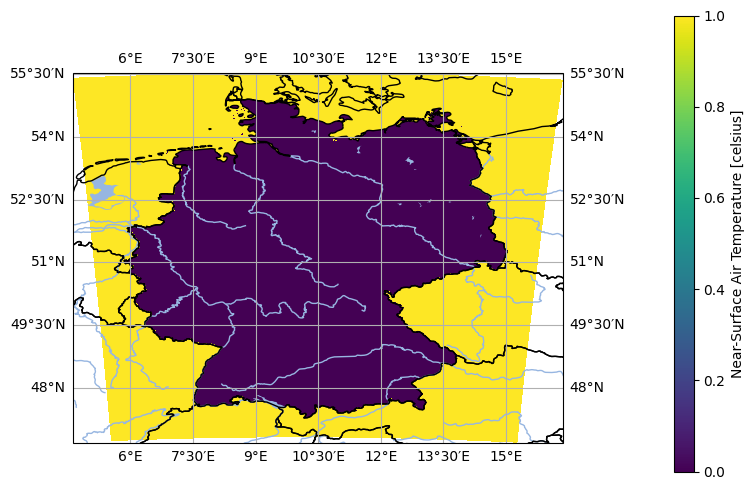
- pyku.mask.get_mask(dat)[source]#
Get mask from Dataset.
- Parameters:
ds (
xarray.Dataset) – The input dataset.- Returns:
The dataset mask.
- Return type:
Example
In [1]: import pyku
   ...: ds = pyku.resources.get_test_data('hostrada')
   ...: mask = ds.pyku.get_mask()
   ...: pyku.analyse.one_map(mask, var='mask')
   ...: