
Having Fun with CMOR#
pyku provides functions to CMORize data, automatically handling a significant number of attributes and unit conversions. However, global attributes must be manually set, as they cannot be inferred. The first step, as usual, is to load the xarray library and the pyku extension.
[1]:
import xarray as xr
import pyku
DRS definition#
pyku includes DRS definition files. You can display the full list of implemented CMOR and CMOR-like DRS definitions as follows:
[2]:
pyku.list_drs_standards()
[2]:
['cmip6',
 'cmip5',
 'cordex',
 'cordex_adjust',
 'cordex_interp',
 'cordex_adjust_interp',
 'cordex_cmip6',
 'hyras',
 'reanalysis',
 'climate_predictions',
 'cosmo-rea6',
 'eobs',
 'obs4mips',
 'seamless']
In this tutorial, we will CMORize COSMO-CLM data using the CORDEX CMOR standard. Behind the scenes, pyku utilizes YAML metadata files, which are structured like this:
cordex:

    # References
    # ----------

    # http://is-enes-data.github.io/
    # http://is-enes-data.github.io/cordex_archive_specifications.pdf
    # http://is-enes-data.github.io/CORDEX_variables_requirement_table.pdf

    # The stem/parent wording stems from the pathlib library
    # https://docs.python.org/3/library/pathlib.html

    metadata:
        - CORDEX_domain
        - driving_model_id
        - driving_experiment_name
        - driving_model_ensemble_member
        - model_id
        - rcm_version_id
        - frequency
        - product
        - institute_id
        - experiment_id

    stem_pattern:
        "{variable_name}_{CORDEX_domain}_{driving_model_id}_\
         {driving_experiment_name}_{driving_model_ensemble_member}_\
         {model_id}_{rcm_version_id}_{frequency}_{start_time}-{end_time}"

    parent_pattern:
        "{product}/{CORDEX_domain}/{institute_id}/{driving_model_id}/\
         {experiment_id}/{driving_model_ensemble_member}/{model_id}/\
         {rcm_version_id}/{frequency}"
Get exemplary ICON data#
Get ICON exemplary data, which consists of raw model output without any post-processing.
[3]:
# List files using UNIX file pattern
# ----------------------------------

grib_files = pyku.resources.get_test_data('icon_grib_files')
grid_file = pyku.resources.get_test_data('icon_grid_file')
Downloading file 'ICON-DREAM-EU_202501_T_2M_hourly.grb' from 'https://opendata.dwd.de/climate_environment/REA/ICON-DREAM-EU/hourly/T_2M/ICON-DREAM-EU_202501_T_2M_hourly.grb' to '/home/runner/work/pyku/pyku/pyku_cache'.
Downloading file 'icon_grid_0027_R03B08_N02.nc' from 'http://icon-downloads.mpimet.mpg.de/grids/public/edzw/icon_grid_0027_R03B08_N02.nc' to '/home/runner/work/pyku/pyku/pyku_cache'.
Exploring the dataset#
We open the dataset using standard xarray options. It is important to specify how xarray should handle variables when working with multiple files. By default, georeferencing metadata (like the CRS attribute) is tied to the time dimension. Here, we instruct xarray to treat the CRS as a single variable across all files, independent of dataset dimensions, if it remains the same. Additionally, for this demonstration, we only use a subset of the data to ensure faster execution. In the background, both xarray and pyku are optimized for handling large datasets, allowing terabytes of data to be lazily loaded and processed on demand.
[4]:
ds = xr.open_mfdataset(
    grib_files,
    engine='cfgrib',
    combine='nested',
    compat='no_conflicts',
    coords='different',
    time_dims=["valid_time"]
)

ds
ecCodes provides no latitudes/longitudes for gridType='unstructured_grid'
[4]:
<xarray.Dataset> Size: 2GB
Dimensions:            (valid_time: 744, values: 659156)
Coordinates:
  * valid_time         (valid_time) datetime64[ns] 6kB 2025-01-01 ... 2025-01...
    heightAboveGround  float64 8B ...
Dimensions without coordinates: values
Data variables:
    t2m                (valid_time, values) float32 2GB dask.array<chunksize=(744, 659156), meta=np.ndarray>
Attributes:
    GRIB_edition:            2
    GRIB_centre:             edzw
    GRIB_centreDescription:  Offenbach
    GRIB_subCentre:          255
    Conventions:             CF-1.7
    institution:             Offenbach
history: 2026-07-10T08:03 GRIB to CDM+CF via cfgrib-0.9.1...Modify the data#
This preprocessing step standardizes the raw GRIB data for compatibility with pyku. Specifically, we rename the valid_time dimension to time and drop the original model-run initialization time and the forecast time step. Since the dataset is strictly 2D, the heightAboveGround coordinate is removed to simplify the data structure. Finally, we rename the data variable to cell, which is a prerequisite for correctly mapping the geographic coordinate system in subsequent steps.
[5]:
ds = ds.drop_vars(['heightAboveGround'])
ds = ds.rename({'valid_time': 'time'})
ds = ds.rename_dims({'values': 'cell'})
Attach the georeferencing#
ICON model output is typically stored on an unstructured grid, where meteorological variables are separated from their spatial coordinates. To perform georeferencing, we must retrieve a standalone grid file (external coordinates) containing the latitude and longitude for each cell center. This grid information is essential for mapping the raw data to a geographic coordinate system.
[6]:
grid = xr.open_dataset(
    pyku.resources.get_test_data('icon_grid_file')
)
We can merge the grid cell center latitudes and longitudes to the data
[7]:
ds = xr.merge([
    ds,
    grid[['clon', 'clat']]
])
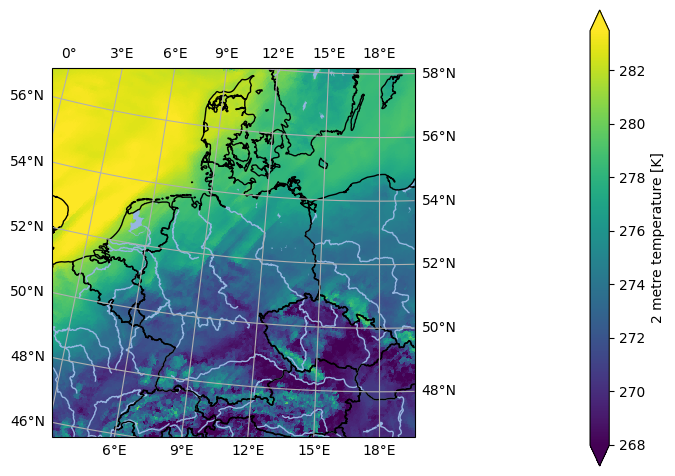
Regridding the data#
With the coordinates attached, we can now apply one of pyku’s pre-defined geographic projections. Note that pyku does not currently support spatial projections for dask-chunked data on unstructured grids; datasets must be loaded into memory before the transformation.
[8]:
ds = ds.chunk(chunks=-1).pyku.project('GER-0275')
2026-07-10 08:03:28,146 - pyku - geo - 824- WARNING - longitude unit conversion from radians to degrees
2026-07-10 08:03:28,148 - pyku - geo - 828- WARNING - latitude unit conversion from radians to degrees
[9]:
ds.isel(time=0).ana.one_map(var='t2m', crs='GER-0275')
<Figure size 640x480 with 0 Axes>
Selecting variables for CMORization#
pyku can select a single variable as a dataset, with all global attributes kept, and perform the CMORization process. It is important to note that CMORization should be done one variable at a time. To list all available georeferenced data that can be CMORized (excluding non-data variables like the CRS or time bounds), you can use the following pyku functionality.
[10]:
ds.pyku.get_geodata_varnames()
[10]:
['t2m']
From this list, you can select a specific variable while preserving all its attributes. Special variables, such as the CRS and time bounds, are automatically handled.
Setting CMOR attibutes and names#
The dataset is now ready for CMORization. Note that all variable attributes and conventions are applied, except for the global metadata, which still need to be set.
[11]:
cmorized = ds.pyku.get_geodataset('t2m').pyku.cmorize()
cmorized
[11]:
<xarray.Dataset> Size: 525MB
Dimensions:       (time: 744, rlat: 423, rlon: 415)
Coordinates:
  * time          (time) datetime64[ns] 6kB 2025-01-01 ... 2025-01-31T23:00:00
  * rlat          (rlat) float64 3kB 7.439 7.411 7.384 ... -4.111 -4.139 -4.166
  * rlon          (rlon) float64 3kB -10.29 -10.27 -10.24 ... 1.036 1.064 1.091
    lat           (rlat, rlon) float64 1MB 56.87 56.88 56.88 ... 46.57 46.57
    lon           (rlat, rlon) float64 1MB -0.9172 -0.869 ... 19.54 19.58
Data variables:
    tas           (time, rlat, rlon) float32 522MB dask.array<chunksize=(744, 423, 415), meta=np.ndarray>
    rotated_pole  int32 4B 1
Attributes:
    GRIB_edition:            2
    GRIB_centre:             edzw
    GRIB_centreDescription:  Offenbach
    GRIB_subCentre:          255
    Conventions:             CF-1.7
    institution:             Offenbach
    history:                 2026-07-10T08:03 GRIB to CDM+CF via cfgrib-0.9.1...
    CORDEX_domain:           undefined
frequency: 1hrFor verification, run a DRS check using the following command:
[12]:
cmorized.pyku.check_drs(standard='cordex')
[12]:
| key | value | issue | |
|---|---|---|---|
| 0 | CORDEX_domain | undefined | NaN |
| 1 | driving_model_id | NaN | missing value |
| 2 | driving_experiment_name | NaN | missing value |
| 3 | driving_model_ensemble_member | NaN | missing value |
| 4 | model_id | NaN | missing value |
| 5 | rcm_version_id | NaN | missing value |
| 6 | frequency | 1hr | NaN |
| 7 | product | NaN | missing value |
| 8 | institute_id | NaN | missing value |
| 9 | experiment_id | NaN | missing value |
Setting global metadata#
Running a sanity check to verify compliance with the standard, we confirm that the global metadata have not been set, as they cannot be inferred automatically. The global metadata must be manually provided to the cmorize function in the form of a dictionary. For operational use, it is recommended to define this metadata in a YAML file, which can then be loaded into a dictionary
[13]:
global_metadata = {
    'title': (
        "COSMO_CLM_5.00_clm16 simulation (0.0275 Deg) with ERA5T (direct nest, since "
        "2022) forcing, domain Germany, FPS-C tuned setup"
    ),
    'CORDEX_domain': 'GER-0275',
    'driving_model_id': 'ECMWF-ERA5T',
    'driving_experiment_name': 'evaluation',
    'experiment_id': 'evaluation',
    'driving_experiment': 'ECMWF-ERA5T, evaluation, r1i1p1',
    'driving_model_ensemble_member': 'r1i1p1',
    'experiment': 'evaluation run with ECMWF-ERA5T reanalysis forcing',
    'model_id': 'CLMcom-DWD-CCLM5-0-16',
    'institute_id': 'CLMcom-DWD',
    'institution': (
        "DWD (Deutscher Wetterdienst, Offenbach, Germany) in collaboration with the "
        "CLM-Community"
    ),
    'rcm_version_id': 'x0n1-v1',
    'contact': 'klima.offenbach@dwd.de',
    'nesting_levels': '1',
    'comment_nesting': 'these are results of a direct downscaling (one nest) approach',
    'comment_1stNest': (
        "convection permitting simulation driven by ECMWF-ERA5T (direct downscaling) "
        "comment_2ndNest: not used "
    ),
    'comment': (
        "Convection-permitting evaluation run for Germany (HoKliSim-DeT) performed by "
        "DWD Offenbach. Configuration adapted from the CORDEX FPS Convection setup, "
        "which was developed and tuned by the CRCS working group of the CLM Community. "
        "Computing system: Aurora NEC at DWD. The Deutscher Wetterdienst (DWD) is the "
        "producer of the data. The General Terms and Conditions of Business and "
        "Delivery apply for services provided by DWD "
        "(http://www.dwd.de/EN/service/terms/terms.html)."
    ),
    "rcm_config_cclm": "GER-0275_CLMcom-DWD-CCLM5-0-16_config",
    "rcm_config_int2lm": "GER-0275_CLMcom-DWD-INT2LM2-0-6-modif_config",
    "source": "Climate Limited-area Modelling Community (CLM-Community)",
    "references": "http://www.clm-community.eu, http://www.dwd.de",
    "product": "output",
    "project_id": "DWD-CPS",
}
Now, we CMORize the data again, this time setting the global attributes for CMOR compliance. Afterward, we perform another sanity check and observe that the global attributes have been correctly set.
[14]:
cmorized = ds.pyku.get_geodataset('t2m')
cmorized = cmorized.pyku.cmorize(global_metadata=global_metadata)
cmorized.pyku.check_drs(standard='cordex')
[14]:
| key | value | issue | |
|---|---|---|---|
| 0 | CORDEX_domain | GER-0275 | None |
| 1 | driving_model_id | ECMWF-ERA5T | None |
| 2 | driving_experiment_name | evaluation | None |
| 3 | driving_model_ensemble_member | r1i1p1 | None |
| 4 | model_id | CLMcom-DWD-CCLM5-0-16 | None |
| 5 | rcm_version_id | x0n1-v1 | None |
| 6 | frequency | 1hr | None |
| 7 | product | output | None |
| 8 | institute_id | CLMcom-DWD | None |
| 9 | experiment_id | evaluation | None |
An additional sanity check can be performed using the pyku check function to identify any potential issues:
[15]:
cmorized.pyku.check_metadata(standard='cordex')
[15]:
| key | value | issue | description | |
|---|---|---|---|---|
| 0 | y_projection_coordinate_exist | True | None | Checking if y projection coordinate available |
| 1 | x_projection_coordinate_exist | True | None | Checking if x projection coordinate available |
| 2 | lat_geographic_coordinate_exist | True | None | Checking if lat geographic coordinate available |
| 3 | lon_geographic_coordinate_exist | True | None | Checking if lon geographic coordinate available |
| 4 | y_projection_coordinate_unit_correct | True | None | Checking if y projection coordinates units |
| 5 | x_projection_coordinate_unit_correct | True | None | Checking if x projection coordinates units |
| 6 | y_projection_coordinate_standard_name_correct | True | None | Checking y projection coordinates standard_name |
| 7 | x_projection_coordinate_standard_name_correct | True | None | Checking x projection coordinates standard_name |
| 8 | lat_geographic_coordinate_unit_correct | True | None | Checking lat geographic coordinate units |
| 9 | lon_geographic_coordinate_unit_correct | True | None | Checking if lat geographic coordinate units |
| 10 | lat_geographic_coordinate_standard_name_correct | True | None | Checking lat geographic coordinate standard_name |
| 11 | lon_geographic_coordinate_standard_name_correct | True | None | Checking lon geographic coordinate standard_name |
| 12 | cf_area_def_readable | True | None | Check if CF projection metadata are readable |
| 13 | area_extent_is_readable | True | None | Check if the area extent can be determined fro... |
| 14 | longitudes_within_180W_and_180E | True | None | Check that the longitudes are within 180 degre... |
| 15 | tas_units_can_be_read | True | None | Check if units can be read automatically |
| 16 | tas | tas | None | NaN |
| 17 | is_cmor_standard_name | True | None | If possible, check if standard name is CMOR co... |
| 18 | is_cmor_long_name | False | tas long_name is Near-Surface Air Temperature ... | Check if long_name is CMOR conform |
| 19 | is_cmor_units | False | tas unit is kelvin but the expected units is {... | Check if units is CMOR conform |
| 20 | frequency_can_be_inferred_from_data | True | None | Tried to infer frequency from the time labels |
| 21 | frequency_can_be_determined | True | None | Check if frequency can be determined from the ... |
| 22 | geodata_vars | [tas] | None | NaN |
| 23 | geographic_latlon | (lat, lon) | None | NaN |
| 24 | projection_yx | (rlat, rlon) | None | NaN |
| 25 | time_dependent_vars | [tas] | None | NaN |
| 26 | time_bounds_var | None | None | NaN |
| 27 | spatial_bounds_vars | [] | None | NaN |
| 28 | spatial_vertices_vars | [] | None | NaN |
| 29 | crs_var | rotated_pole | None | NaN |
| 30 | unidentified_vars | [] | None | NaN |
| 31 | has_time_dimension | True | None | Check if data have a time dimension |
| 32 | time_is_numpy_datetime64_or_cftime | True | None | Check the data type of the time stamps |
| 33 | CORDEX_domain | GER-0275 | None | NaN |
| 34 | driving_model_id | ECMWF-ERA5T | None | NaN |
| 35 | driving_experiment_name | evaluation | None | NaN |
| 36 | driving_model_ensemble_member | r1i1p1 | None | NaN |
| 37 | model_id | CLMcom-DWD-CCLM5-0-16 | None | NaN |
| 38 | rcm_version_id | x0n1-v1 | None | NaN |
| 39 | frequency | 1hr | None | NaN |
| 40 | product | output | None | NaN |
| 41 | institute_id | CLMcom-DWD | None | NaN |
| 42 | experiment_id | evaluation | None | NaN |
CMORized data filename#
From here, we can verify the name that the final data file should have.
[16]:
cmorized.pyku.drs_filename(standard='cordex')
[16]:
'output/GER-0275/CLMcom-DWD/ECMWF-ERA5T/evaluation/r1i1p1/CLMcom-DWD-CCLM5-0-16/x0n1-v1/1hr/tas/tas_GER-0275_ECMWF-ERA5T_evaluation_r1i1p1_CLMcom-DWD-CCLM5-0-16_x0n1-v1_1hr_2025010100-2025013123.nc'
Geographic projections#
The data can be reprojected as needed, with all available CMOR metadata set automatically. Note how the grid has been modified in the metadata to comply with the CMOR standard.
[17]:
cmorized = ds.pyku.get_geodataset('t2m')
cmorized = cmorized.pyku.cmorize(global_metadata=global_metadata)
cmorized = cmorized.pyku.project('HYR-LAEA-5')
cmorized.pyku.check_drs(standard='cordex')
[17]:
| key | value | issue | |
|---|---|---|---|
| 0 | CORDEX_domain | undefined | None |
| 1 | driving_model_id | ECMWF-ERA5T | None |
| 2 | driving_experiment_name | evaluation | None |
| 3 | driving_model_ensemble_member | r1i1p1 | None |
| 4 | model_id | CLMcom-DWD-CCLM5-0-16 | None |
| 5 | rcm_version_id | x0n1-v1 | None |
| 6 | frequency | 1hr | None |
| 7 | product | output | None |
| 8 | institute_id | CLMcom-DWD | None |
| 9 | experiment_id | evaluation | None |
The filename should now be as follows:
[18]:
cmorized.pyku.drs_filename(standard='cordex')
[18]:
'output/undefined/CLMcom-DWD/ECMWF-ERA5T/evaluation/r1i1p1/CLMcom-DWD-CCLM5-0-16/x0n1-v1/1hr/tas/tas_undefined_ECMWF-ERA5T_evaluation_r1i1p1_CLMcom-DWD-CCLM5-0-16_x0n1-v1_1hr_2025010100-2025013123.nc'
Resampling data#
Similarly, we can transform the data through resampling.
[19]:
cmorized = ds.pyku.get_geodataset('t2m')
cmorized = cmorized.pyku.project('HYR-LAEA-5')
cmorized = cmorized.pyku.resample_datetimes(frequency='1D', how='mean')
cmorized = cmorized.pyku.cmorize(global_metadata=global_metadata)
cmorized
2026-07-10 08:03:45,095 - pyku - timekit - 315- WARNING - t2m: 'cell_methods' was not set automatically
[19]:
<xarray.Dataset> Size: 8MB
Dimensions:    (time: 31, y: 220, x: 258, bnds: 2)
Coordinates:
  * time       (time) datetime64[ns] 248B 2025-01-01T12:00:00 ... 2025-01-31T...
  * y          (y) float64 2kB 3.586e+06 3.582e+06 ... 2.496e+06 2.492e+06
  * x          (x) float64 2kB 3.808e+06 3.814e+06 ... 5.088e+06 5.094e+06
    lat        (y, x) float64 454kB 55.13 55.13 55.14 ... 45.09 45.08 45.08
    lon        (y, x) float64 454kB 1.95 2.028 2.106 2.184 ... 19.7 19.76 19.83
Dimensions without coordinates: bnds
Data variables:
    tas        (time, y, x) float32 7MB dask.array<chunksize=(31, 220, 258), meta=np.ndarray>
    crs        int32 4B 1
    time_bnds  (time, bnds) datetime64[ns] 496B 2025-01-01 ... 2025-02-01
Attributes: (12/30)
    GRIB_edition:                   2
    GRIB_centre:                    edzw
    GRIB_centreDescription:         Offenbach
    GRIB_subCentre:                 255
    Conventions:                    CF-1.7
    institution:                    DWD (Deutscher Wetterdienst, Offenbach, G...
    ...                             ...
    rcm_config_cclm:                GER-0275_CLMcom-DWD-CCLM5-0-16_config
    rcm_config_int2lm:              GER-0275_CLMcom-DWD-INT2LM2-0-6-modif_config
    source:                         Climate Limited-area Modelling Community ...
    references:                     http://www.clm-community.eu, http://www.d...
    product:                        output
project_id: DWD-CPS[20]:
cmorized.time_bnds
[20]:
<xarray.DataArray 'time_bnds' (time: 31, bnds: 2)> Size: 496B
array([['2025-01-01T00:00:00.000000000', '2025-01-02T00:00:00.000000000'],
       ['2025-01-02T00:00:00.000000000', '2025-01-03T00:00:00.000000000'],
       ['2025-01-03T00:00:00.000000000', '2025-01-04T00:00:00.000000000'],
       ['2025-01-04T00:00:00.000000000', '2025-01-05T00:00:00.000000000'],
       ['2025-01-05T00:00:00.000000000', '2025-01-06T00:00:00.000000000'],
       ['2025-01-06T00:00:00.000000000', '2025-01-07T00:00:00.000000000'],
       ['2025-01-07T00:00:00.000000000', '2025-01-08T00:00:00.000000000'],
       ['2025-01-08T00:00:00.000000000', '2025-01-09T00:00:00.000000000'],
       ['2025-01-09T00:00:00.000000000', '2025-01-10T00:00:00.000000000'],
       ['2025-01-10T00:00:00.000000000', '2025-01-11T00:00:00.000000000'],
       ['2025-01-11T00:00:00.000000000', '2025-01-12T00:00:00.000000000'],
       ['2025-01-12T00:00:00.000000000', '2025-01-13T00:00:00.000000000'],
       ['2025-01-13T00:00:00.000000000', '2025-01-14T00:00:00.000000000'],
       ['2025-01-14T00:00:00.000000000', '2025-01-15T00:00:00.000000000'],
       ['2025-01-15T00:00:00.000000000', '2025-01-16T00:00:00.000000000'],
       ['2025-01-16T00:00:00.000000000', '2025-01-17T00:00:00.000000000'],
       ['2025-01-17T00:00:00.000000000', '2025-01-18T00:00:00.000000000'],
       ['2025-01-18T00:00:00.000000000', '2025-01-19T00:00:00.000000000'],
       ['2025-01-19T00:00:00.000000000', '2025-01-20T00:00:00.000000000'],
       ['2025-01-20T00:00:00.000000000', '2025-01-21T00:00:00.000000000'],
       ['2025-01-21T00:00:00.000000000', '2025-01-22T00:00:00.000000000'],
       ['2025-01-22T00:00:00.000000000', '2025-01-23T00:00:00.000000000'],
       ['2025-01-23T00:00:00.000000000', '2025-01-24T00:00:00.000000000'],
       ['2025-01-24T00:00:00.000000000', '2025-01-25T00:00:00.000000000'],
       ['2025-01-25T00:00:00.000000000', '2025-01-26T00:00:00.000000000'],
       ['2025-01-26T00:00:00.000000000', '2025-01-27T00:00:00.000000000'],
       ['2025-01-27T00:00:00.000000000', '2025-01-28T00:00:00.000000000'],
       ['2025-01-28T00:00:00.000000000', '2025-01-29T00:00:00.000000000'],
       ['2025-01-29T00:00:00.000000000', '2025-01-30T00:00:00.000000000'],
       ['2025-01-30T00:00:00.000000000', '2025-01-31T00:00:00.000000000'],
       ['2025-01-31T00:00:00.000000000', '2025-02-01T00:00:00.000000000']],
      dtype='datetime64[ns]')
Coordinates:
* time (time) datetime64[ns] 248B 2025-01-01T12:00:00 ... 2025-01-31T12...
Dimensions without coordinates: bndsAgain, note that the metadata have been set in accordance with the CMOR standard during this operation.
[21]:
cmorized.pyku.check_drs(standard='cordex')
[21]:
| key | value | issue | |
|---|---|---|---|
| 0 | CORDEX_domain | GER-0275 | None |
| 1 | driving_model_id | ECMWF-ERA5T | None |
| 2 | driving_experiment_name | evaluation | None |
| 3 | driving_model_ensemble_member | r1i1p1 | None |
| 4 | model_id | CLMcom-DWD-CCLM5-0-16 | None |
| 5 | rcm_version_id | x0n1-v1 | None |
| 6 | frequency | day | None |
| 7 | product | output | None |
| 8 | institute_id | CLMcom-DWD | None |
| 9 | experiment_id | evaluation | None |
Pay particular attention to how the variable attributes and the cell_methods have been set:
[22]:
cmorized.tas.attrs
[22]:
{'GRIB_paramId': 167,
 'GRIB_dataType': 'fc',
 'GRIB_numberOfPoints': 659156,
 'GRIB_typeOfLevel': 'heightAboveGround',
 'GRIB_stepUnits': 1,
 'GRIB_stepType': 'instant',
 'GRIB_gridType': 'unstructured_grid',
 'GRIB_NV': 0,
 'GRIB_cfName': 'air_temperature',
 'GRIB_cfVarName': 't2m',
 'GRIB_gridDefinitionDescription': 'General unstructured grid',
 'GRIB_missingValue': 3.4028234663852886e+38,
 'GRIB_name': '2 metre temperature',
 'GRIB_shortName': '2t',
 'GRIB_units': 'K',
 'long_name': 'Near-Surface Air Temperature',
 'standard_name': 'air_temperature',
 'grid_mapping': 'crs',
 'units': 'kelvin',
 'cell_methods': 'time: point'}
Writing NetCDF data#
The final step is to write the data, which can be quite large, into packets that conform to the CMOR standard. Specifically, this means:
Hourly data will be split into packets of one year.
Three-hourly data will be split into packets of one year.
Six-hourly data will be split into packets of one year.
Twelve-hourly data will be split into packets of five years.
Daily data will be split into packets of five years.
Monthly data will be split into packets of ten years.
Seasonal data will be split into packets of ten years.
Yearly data and above will be split into packets of one hundred years.
For this demonstration, we are using only a subset of data to ensure the tutorial runs in a timely manner, rather than showcasing the full capabilities. However, this functionality is built-in and will operate automatically for large datasets without requiring user input. First, we create a temporary directory to store the data. This directory will be deleted at the end of this session.
[23]:
import tempfile

temp_dir = tempfile.TemporaryDirectory()
print("Temporary directory:", temp_dir.name)
Temporary directory: /tmp/tmpss3_k0q3
[24]:
pyku.drs.to_drs_netcdfs(cmorized, base_dir=temp_dir.name, standard='cordex')
[25]:
!find {temp_dir.name} -type f
/tmp/tmpss3_k0q3/output/GER-0275/CLMcom-DWD/ECMWF-ERA5T/evaluation/r1i1p1/CLMcom-DWD-CCLM5-0-16/x0n1-v1/day/tas/tas_GER-0275_ECMWF-ERA5T_evaluation_r1i1p1_CLMcom-DWD-CCLM5-0-16_x0n1-v1_day_20250101-20250131.nc
[26]:
file = !find {temp_dir.name} -type f
!ncdump -h {file[0]}
/bin/bash: line 1: ncdump: command not found
And finally cleanup the temporary directory
[27]:
temp_dir.cleanup()